Implementing GraphQL with React and Node

Talking and consulting on MLOps and machine learning. https://www.linkedin.com/company/monika-mlops-consulting/
Introduction
GraphQL is a fast and modern way to fetch data to your application. It has many advantages, such as: caching, speed and unified data model. It sits between your backend and frontent:
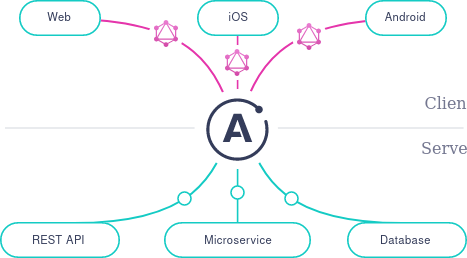 We will be implementing a very simple GraphQL use case for Node.js backend and React.js frontend.
Middleware and Backend
We'll use Apollo and Express server integration: apollo-server-express.
npm i create-react-app graphql apollo-server-express express
Create a folder for a server side:
mkdir server
code apollo_server.js
In the apollo_server.js file import the modules:
const express = require('express');
const { ApolloServer, gql } = require('apollo-server-express');
Then construct a schema with GraphQL language for variables that you will be fetching. Define the type for variables, here it will be a string:
const typeDefs = gql`
  type Query {
    user: String,
    email: String
  }
`;
Now let's create some dummy data. We will later replace this with MongoDB data.
const test_user = 'jaguar'
const test_email = 'jaguar@gmail.com'
Let's use it and create Query resolvers:
const resolvers = {
  Query: {
    user: () => test_user,
    email: () => test_email,
  },
};
Now let's run Apollo Server and make it a middleware in front of our express server:
const server = new ApolloServer({ typeDefs, resolvers });

const app = express();
server.applyMiddleware({ app });

app.listen({ port: 4000 }, () =>
  console.log(`🚀 Server ready at http://localhost:4000${server.graphqlPath}`)
);
We can start the server with:
node apollo_server.js
The whole apollo_server.js file should look like this:
const express = require('express');
const { ApolloServer, gql } = require('apollo-server-express');

const typeDefs = gql`
  type Query {
    user: String,
    email: String
  }
`;

const test_user = 'jaguar'
const test_email = 'jaguar@gmail.com'

const resolvers = {
  Query: {
    user: () => test_user,
    email: () => test_email,
  },
};

const server = new ApolloServer({ typeDefs, resolvers });

const app = express();
server.applyMiddleware({ app });

app.listen({ port: 4000 }, () =>
  console.log(`🚀 Server ready at http://localhost:4000${server.graphqlPath}`)
);
Now let's move on to the front-end.
Frontend
Let's create the folder and the starting application:
mkdir client
cd client
npm i -g create-react-app
create-react-app test_book
cd test_book
npm i @apollo/react-hooks apollo-boost
cd src
code index.js
Import the Apollo hooks, client and connect it to the server:
import { ApolloProvider } from '@apollo/client';
import ApolloClient from 'apollo-boost';

const client = new ApolloClient({
  uri: 'http://localhost:4000',
});
Add Apollo Client context to the App component:
ReactDOM.render(
  <React.StrictMode>
    <ApolloProvider client={client}>
      <App />
    </ApolloProvider>
  </React.StrictMode>,
  document.getElementById('root')
);
The whole index.js file should look like this:
import { ApolloProvider } from '@apollo/client';
import ApolloClient from 'apollo-boost';

const client = new ApolloClient({
  uri: 'http://localhost:4000/graphql',
});

ReactDOM.render(
  <React.StrictMode>
    <ApolloProvider client={client}>
      <App />
    </ApolloProvider>
  </React.StrictMode>,
  document.getElementById('root')
);

serviceWorker.unregister();
Now we will use useQuery hook to query data from the Apollo server. Open App.js:
const USER_QUERY = gql`
  {
    user
    email
  }
`;
Fetch the data, display whether the data was loading or an error happened:
const App = () => {
  const { loading, error, data } = useQuery(USER_QUERY);
  if (loading) {
    return <p>Loading...</p>;
  }
  if (error) {
    console.log(error)
    return <p>Error :(</p>;
  }
  return (
    <div className="App">
      <header className="App-header">
        <p>
          User is: {data.user}
        </p>
        <p>
          Email is: {data.email}
        </p>
      </header>
    </div>
  );
}
You shoul see the data successfully loaded in the browser:
 The whole App.js file should be:
import React from 'react';
import './App.css';
import { useQuery } from '@apollo/react-hooks';
import { gql } from 'apollo-boost';

const USER_QUERY = gql`
  {
    user
    email
  }
`;

const App = () => {
  const { loading, error, data } = useQuery(USER_QUERY);
  if (loading) {
    return <p>Loading...</p>;
  }
  if (error) {
    console.log(error)
    return <p>Error :(</p>;
  }
  return (
    <div className="App">
      <header className="App-header">
        <p>
          User is: {data.user}
        </p>
        <p>
          Email is: {data.email}
        </p>
      </header>
    </div>
  );
}

export default App;
Enjoy - you just made a successfull GraphQL query! In the following tutorial we will tailor our query to the full user model.
Let the good times roll!